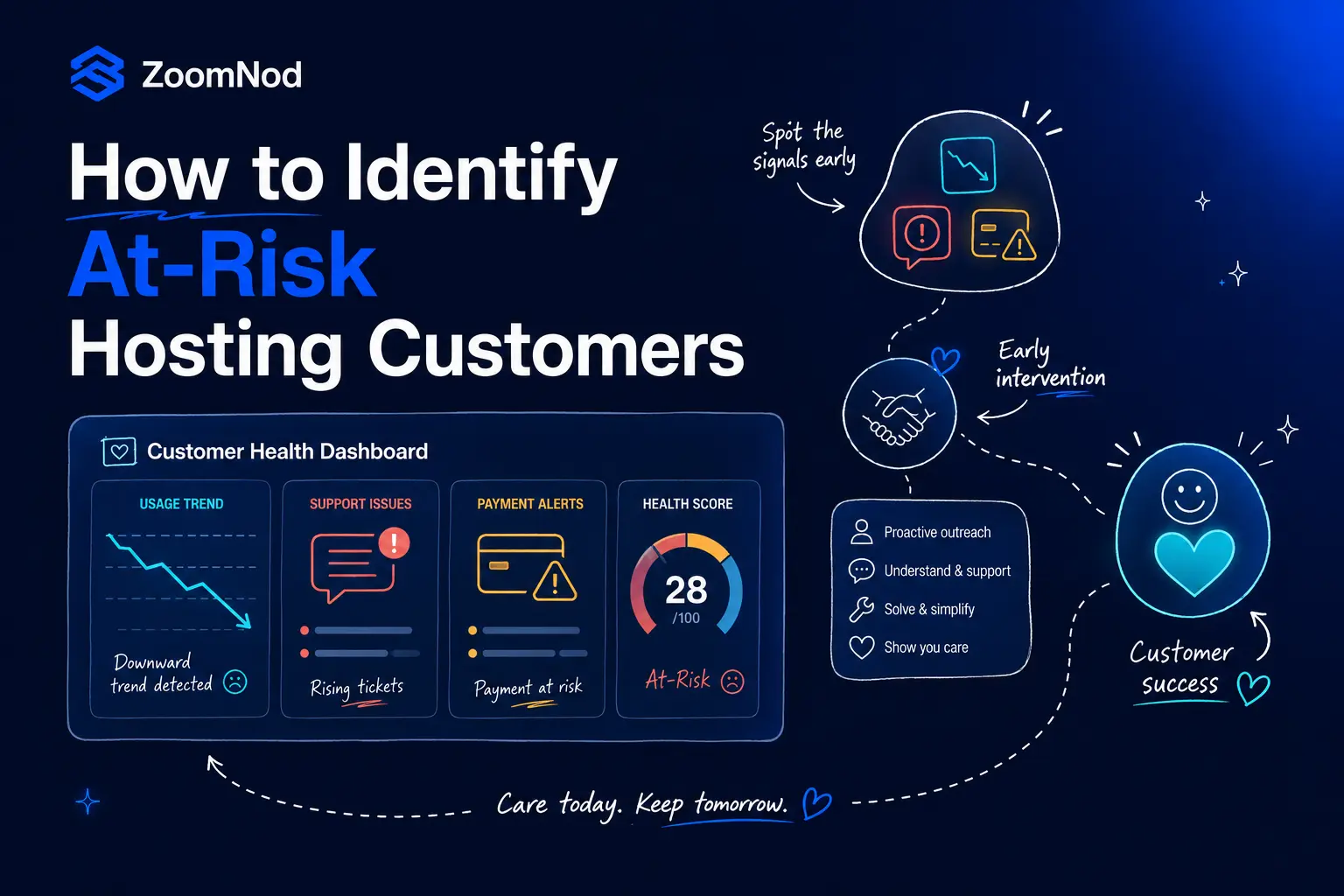
Hosting customers rarely become high risk at the exact moment they click a cancellation button.
Many accounts show warning signs earlier through incomplete onboarding, declining usage, repeated support problems, failed payments, negative feedback or reduced engagement.
Identifying these signals early gives a hosting company more time to understand the problem and provide a relevant response.
The objective is not to pressure every customer into staying. It is to distinguish healthy accounts from customers who may need technical help, a plan review, clearer billing information, migration support or personal account management.
A useful customer risk system combines product usage, onboarding progress, support history, billing behavior, renewal timing, customer sentiment and commercial value. It should also explain why an account is considered at risk so the company can choose the right intervention.
A shared hosting customer who never connects a domain requires a different response from a managed VPS customer with several unresolved support tickets. A dedicated server account approaching contract renewal requires a different workflow from a low value customer with an expired payment card.
Zoomnod provides specialist digital marketing for hosting companies and customer lifecycle services based on six years of hosting industry experience and work with multiple hosting providers.
Customer quality and future risk should also be reviewed across SEO for hosting companies, Google Ads for hosting companies, LinkedIn Ads for hosting companies, affiliate marketing for hosting companies, social media marketing for hosting companies and lead generation for hosting companies. A channel should be assessed by activation, support pressure, renewal and customer lifetime value, not only the initial conversion.
What Is an At-Risk Hosting Customer?
An at-risk hosting customer is an account showing evidence that the relationship, subscription or future renewal may be in danger.
Risk may result from poor product fit, low adoption, technical problems, billing failure, dissatisfaction, business change or reduced need.
An account should not be labelled high risk based on one weak signal alone. For example, a customer who logs in less often may still be satisfied if the hosting service is stable and requires little administration.
Assess risk using several signals and compare current behavior with the customer’s normal pattern.
Risk Categories
- Onboarding risk
- Product adoption risk
- Support risk
- Billing risk
- Renewal risk
- Relationship risk
- Technical fit risk
- Commercial risk
Why Early Risk Detection Matters
A cancellation request is a late stage signal.
By that point, the customer may already have selected another provider, exported data, transferred a domain or planned a migration.
Early detection gives the company more time to investigate the underlying issue and prioritize resources.
High value managed hosting or dedicated server accounts may justify personal intervention, while lower value self service accounts may use automated guidance.
Patterns across many accounts may reveal a weak onboarding step, unclear pricing, a recurring technical problem or a campaign attracting unsuitable customers.
Use Multiple Data Sources
Customer risk should be evaluated using more than one department’s data.
Product usage may show declining activity, while support data reveals unresolved frustration and billing data shows an upcoming payment problem.
Together, these signals provide a more complete view.
- Customer portal activity
- Hosting control panel activity
- Server and resource usage
- Onboarding progress
- Migration status
- Support tickets
- Customer satisfaction feedback
- Billing and payment history
- Renewal dates
- Email engagement
- CRM activity
- Sales and account management notes
- Cancellation page activity
- Plan changes
- Domain and service changes
Identify Onboarding Risk Signals
New customers are often most vulnerable before they reach first value.
If new customers are leaving before their first successful deployment, focus on reducing early hosting churn.
A customer who purchases but never activates the service may appear successful in acquisition reporting while remaining commercially fragile.
Common Onboarding Risk Signals
- Customer has not accessed the account.
- Domain is not connected.
- Website installation is incomplete.
- Migration has not started or has missed a milestone.
- VPS has not been accessed.
- Application has not been deployed.
- Backup is not configured.
- Security setup is incomplete.
- Customer repeatedly views setup documentation.
- Several onboarding support tickets are opened.
- Customer requests a refund during setup.
Recommended Responses
- Send task specific guidance.
- Offer migration assistance.
- Escalate repeated setup failures.
- Review whether the customer selected the correct plan.
- Provide a human onboarding contact for higher value accounts.
- Clarify managed and unmanaged responsibilities.
These workflows can be delivered through email marketing for hosting companies.
Monitor Product Usage and Adoption
Product usage is a valuable source of customer health information, but it must be interpreted in context.
A sudden decline from normal usage can be more meaningful than a low absolute number.
Shared Hosting
Healthy signals:
- Domain connected
- Website active
- Traffic received
- Email accounts used
- Backups enabled
Risk signals:
- No website published
- Traffic disappears
- Domain is removed
- No email use
- Account remains inactive
VPS
Healthy signals:
- Server accessed
- Application active
- Resources used
- Backups configured
- Monitoring enabled
Risk signals:
- No server access
- Usage falls sharply
- Application is removed
- Backups are disabled
- Repeated resource limit events
Agency Hosting
Healthy signals:
- Client sites added
- Team members active
- Staging used
- Additional sites created
Risk signals:
- Client sites removed
- No new sites added
- Team activity declines
- Migration stops
Managed Hosting
Healthy signals:
- Migration completed
- Monitoring active
- Support relationship established
- Regular account reviews
Risk signals:
- Unresolved migration issue
- Repeated escalation
- Stakeholder disengagement
- Account review declined
Detect Support-Related Risk
Support data can reveal customer frustration before cancellation.
When repeated tickets or unresolved incidents drive the risk score, see how to improve hosting support for customer retention.
The number of tickets alone is not enough. A technically active customer may submit many routine questions while remaining healthy.
Stronger signals include unresolved cases, repeated contact about the same issue, negative feedback and long periods without clear ownership.
- Several open support tickets
- Repeated tickets about the same issue
- Critical issue remains unresolved
- Customer repeats information across interactions
- Negative satisfaction feedback
- Escalation request
- Complaint about response quality
- Customer asks for data export or migration help
- Support contact increases before renewal
- High value account has no named owner
Recommended Actions
- Assign case ownership.
- Escalate recurring technical problems.
- Review the complete support history.
- Contact the customer with a resolution plan.
- Confirm whether the current product remains suitable.
- Follow up after the issue is resolved.
Identify Billing and Payment Risk
Not every customer lost to a billing issue intended to leave.
Involuntary churn can occur when a payment method expires, a bank declines the transaction or billing information is outdated.
- Payment method approaching expiration
- Previous failed payment
- Repeated payment retries
- Outstanding invoice
- Changed billing contact
- Customer has not opened renewal notices
- High value account has incomplete procurement information
- Customer requests a billing cycle change
- Customer disputes an invoice
- Payment failure occurs near suspension
Recommended Responses
- Send a clear payment update request.
- Provide a direct billing link.
- Confirm the affected service and amount.
- Use appropriate payment retries.
- Escalate high value accounts to billing or account management.
- Stop recovery messages after successful payment.
Monitor Renewal Risk
Renewal risk increases when the customer approaches the billing or contract date with unresolved product, support or billing issues.
Begin a renewal health review before the final reminder.
- Low product adoption
- Open critical support issue
- Negative feedback
- Customer has not responded to account reviews
- Renewal price has not been clearly communicated
- Payment method is invalid
- Customer requests a quote from another plan
- Customer asks about cancellation terms
- Customer downloads account data
- Domain transfer is initiated
- Stakeholder contacts have changed
- Contract notice period is approaching
Clear pricing, renewal messaging and plan selection should also be reviewed through conversion rate optimisation for hosting companies.
Track Cancellation Intent Signals
Certain customer actions indicate stronger cancellation intent than general disengagement.
These signals should trigger careful review rather than immediate promotional messaging.
- Cancellation page visited
- Cancellation reason selected
- Domain transfer authorization requested
- Data export activity
- Backup download before renewal
- Service downgrade request
- Request for termination terms
- Migration support request to another provider
- Customer removes websites or applications
- Customer asks for final invoice
Recommended Responses
- Ask whether assistance is required.
- Review unresolved product or support issues.
- Offer a suitable plan change when relevant.
- Provide a clear migration or cancellation process.
- Avoid obstructing the customer.
- Record the reason for future analysis.
Include Customer Sentiment
Usage and billing data do not always explain how the customer feels about the relationship.
Customer feedback, support language and account management notes can reveal dissatisfaction that product metrics miss.
- Negative survey response
- Complaint about repeated incidents
- Customer expresses low confidence
- Customer stops attending account reviews
- Decision maker disengages
- Customer questions value
- Customer compares the service with competitors
- Customer asks for a lower cost alternative
Build a Hosting Customer Health Score
A customer health score combines several signals into a structured view of account condition.
The score should help teams prioritize and understand risk, not replace judgment.
The model should be explainable, product specific and tested against actual churn and renewal outcomes.
| Category | Example Weight | Signals |
|---|---|---|
| Onboarding | 20% | Account access, migration completion and first value achievement |
| Product adoption | 25% | Usage trend, feature adoption and active workloads |
| Support | 20% | Open cases, repeated issues and satisfaction |
| Billing | 15% | Payment status, invoice age and payment method validity |
| Relationship and renewal | 20% | Account engagement, renewal timing and stakeholder activity |
Example Health Score Bands
| Band | Range | Meaning |
|---|---|---|
| Healthy | 80 to 100 | The account is active, receiving value and has no major unresolved risk. |
| Watch | 60 to 79 | The account has one or more warning signs that require monitoring. |
| At risk | 40 to 59 | The customer has meaningful adoption, support, billing or relationship problems. |
| Critical | 0 to 39 | The account shows strong cancellation, nonpayment or service failure risk. |
Weights and thresholds should be validated using actual hosting customer data rather than treated as universal benchmarks.
Make Risk Scores Explainable
A score is difficult to use when teams cannot understand why it changed.
Every at risk account should show the main contributing factors.
- Migration incomplete for 10 days
- Usage declined sharply during the last billing period
- Three unresolved support cases
- Payment method invalid before renewal
- Customer visited cancellation page
- No response from primary stakeholder
- Resource limits reached repeatedly
Segment Risk by Product and Customer Value
The same score should not automatically trigger the same workflow for every account.
Risk response should reflect product complexity, customer value, service criticality and likely cause.
Low Value Self Service Hosting
- Automated guidance
- Billing reminders
- Knowledge base content
- Support option
Mid Value VPS or Agency Hosting
- Behavior based email
- Plan review
- Migration support
- Human follow up after repeated risk
High Value Managed or Dedicated Account
- Named account owner
- Technical review
- Executive or stakeholder contact
- Formal retention plan
Create Risk-Specific Intervention Playbooks
The response should address the reason for risk.
Sending a discount to every at risk customer can waste margin and fail to solve the underlying problem.
Incomplete Onboarding
- Send task specific guidance.
- Offer setup or migration support.
- Escalate blocked customers.
Low Product Adoption
- Explain the next value milestone.
- Provide relevant education.
- Review product fit.
Support Dissatisfaction
- Assign ownership.
- Escalate the issue.
- Communicate a resolution plan.
Payment Risk
- Provide billing update links.
- Use appropriate retries.
- Contact high value accounts.
Resource Limitation
- Review actual usage.
- Recommend a suitable upgrade only when justified.
- Explain pricing and impact.
Cancellation Intent
- Ask for the reason.
- Resolve preventable problems.
- Provide a clear cancellation or migration path.
Use Lifecycle Email to Support At-Risk Customers
Lifecycle email can deliver relevant support at scale when messages are connected to real customer behavior.
Risk communication should remain clear and useful rather than alarmist.
- Incomplete account activation
- Domain not connected
- Migration delayed
- Backup not configured
- Low product adoption
- Payment method update
- Failed payment recovery
- Pre renewal health check
- Support follow up
- Cancellation feedback
- Win back campaign
Build these journeys with email marketing for hosting companies.
Use Content to Resolve Common Risk Drivers
Repeated customer risk patterns can inform onboarding and retention content.
Useful content can help customers resolve common problems before they require support.
- How to connect a domain
- How to configure DNS
- How to migrate a website
- How to secure a VPS
- How to configure backups
- How to monitor server resources
- How to choose the right hosting plan
- Managed versus unmanaged hosting
- How renewal billing works
- How to update payment details
- When to upgrade a hosting plan
- How to contact technical support
These assets can be planned through content marketing for hosting companies.
Connect Risk Data With Acquisition Channels
Customer risk data can improve marketing decisions.
A campaign may generate low cost purchases while producing poor onboarding, high support pressure and early churn. Another channel may create fewer customers with stronger activation and retention.
Compare risk and churn across organic search, Google Ads, LinkedIn Ads, affiliate marketing, content campaigns, email campaigns, social media, referral partners and direct sales.
Related Zoomnod services include SEO for hosting companies, Google Ads for hosting companies, LinkedIn Ads for hosting companies and affiliate marketing for hosting companies.
Measure the Accuracy of the Risk Model
A customer health score should be tested against real outcomes.
Review whether accounts labelled at risk actually cancel, downgrade or fail to renew. Also identify healthy customers incorrectly flagged as high risk.
- Percentage of at risk accounts that churn
- Percentage of churned accounts identified in advance
- False positive rate
- Intervention completion rate
- Cancellation save rate
- Payment recovery rate
- Renewal rate after intervention
- Revenue retained
- Customer satisfaction after intervention
- Risk by product and cohort
Protect Customer Privacy and Data Quality
Customer risk systems rely on behavioral, billing and support data.
The company should use appropriate access controls, data governance and retention policies.
- Define approved data sources.
- Limit access by role.
- Avoid storing unnecessary sensitive information.
- Document score logic.
- Allow human review.
- Correct duplicate and outdated records.
- Respect communication preferences.
- Review automated decisions.
- Maintain clear data ownership.
Common Mistakes When Identifying At-Risk Hosting Customers
- Using one signal to label a customer high risk
- Treating low login frequency as churn proof
- Using one health model for every product
- Ignoring onboarding data
- Ignoring failed payments
- Counting support tickets without reviewing severity
- Creating a score with no explanation
- Sending discounts to every risky account
- Failing to assign intervention ownership
- Ignoring customer value
- Measuring scores without validating outcomes
- Using outdated or incomplete data
A Step-by-Step Hosting Customer Risk Strategy
- Define churn outcomes: Decide whether the model predicts cancellation, nonrenewal, downgrade or failed payment.
- Map available data: Connect onboarding, usage, support, billing and relationship data.
- Define product specific signals: Choose meaningful risk indicators for shared hosting, VPS, managed services and infrastructure.
- Create a health score: Combine signals into explainable health categories.
- Segment by value and risk: Prioritize accounts according to commercial importance and severity.
- Build intervention playbooks: Create responses for onboarding, adoption, support, billing and renewal risk.
- Assign ownership: Define which team handles each risk type.
- Automate appropriate workflows: Use lifecycle email, CRM tasks and alerts.
- Validate the model: Compare risk predictions with actual churn and renewal outcomes.
- Improve continuously: Update signals and thresholds as products and customer behavior change.
How Zoomnod Helps Hosting Companies Identify At-Risk Customers
Zoomnod treats customer risk as a lifecycle challenge rather than a single churn score.
We review how customers are acquired, what happens during onboarding, which product actions indicate value, how support and billing issues appear and which signals occur before cancellation.
- Customer risk audit
- Lifecycle data mapping
- Product specific risk signal design
- Customer health scoring
- At risk customer segmentation
- Lifecycle email planning
- Support and billing intervention workflows
- Renewal risk analysis
- Churn and cohort reporting
- Acquisition channel quality analysis
- Customer retention strategy
- Win back planning
Explore Zoomnod’s digital marketing for hosting companies, email marketing for hosting companies, conversion rate optimisation for hosting companies, content marketing for hosting companies and lead generation for hosting companies.
Build an Early Warning System for Hosting Customer Churn
Zoomnod can review your customer data, onboarding, product usage, billing, support and renewal journeys before creating a practical at risk customer strategy.
Book a Free Consultation
Identify Risk Early and Respond to the Real Problem
Do not identify at risk hosting customers through guesswork or one generic metric.
After identifying a pattern in your risk data, use hosting customer churn interviews to find out what drove the decision to leave.
Effective risk systems combine onboarding, product usage, support, billing, renewal and relationship data.
They compare current behavior with the customer’s normal pattern and explain why the account is considered at risk.
Incomplete onboarding may require setup help. Low adoption may require education. Support dissatisfaction may require escalation. Billing risk may require payment recovery. High value renewal risk may require personal account management.
An effective customer risk strategy connects marketing, product, billing, support and customer success around early, relevant intervention.
Book a free consultation with Zoomnod to discuss your customer risk signals, churn data and hosting retention opportunities.
Frequently Asked Questions
What is an at-risk hosting customer?
An at-risk hosting customer is an account showing signs that it may cancel, fail to renew, downgrade or experience unresolved payment problems.
How can hosting companies identify customers likely to churn?
They can combine onboarding, product usage, support, billing, renewal and customer sentiment data to identify meaningful risk patterns.
What are common hosting churn risk signals?
Common signals include incomplete setup, declining usage, unresolved support tickets, failed payments, negative feedback and cancellation page activity.
What is a hosting customer health score?
A hosting customer health score combines several account signals into an explainable measure of customer condition and churn risk.
Should all hosting products use the same health score?
No. Shared hosting, VPS, managed hosting and dedicated infrastructure have different activation, usage and renewal signals.
Does low login activity mean a hosting customer will churn?
Not necessarily. Some stable hosting customers rarely log in. Usage changes should be interpreted with product context and other risk signals.
How do support tickets indicate churn risk?
Repeated, unresolved or critical support cases can indicate frustration and reduced customer confidence.
How do failed payments affect customer risk?
Failed payments can create involuntary churn even when the customer intends to continue using the service.
What should a hosting company do after identifying an at-risk customer?
The company should identify the primary risk driver and use a relevant response such as setup help, support escalation, payment recovery or a plan review.
How should customer health scores be validated?
Compare predicted risk with actual cancellation, nonrenewal, downgrade and payment recovery outcomes.
Can Zoomnod help identify at-risk hosting customers?
Yes. Zoomnod can review lifecycle data, define risk signals, build customer segments and create retention workflows for hosting companies.
Which early warning signs are most reliable for identifying at-risk hosting customers before they submit a cancellation request?
Declining product usage, incomplete onboarding, repeated support issues, failed payments, negative feedback, and reduced engagement can indicate different types of churn risk. Each signal needs a different intervention.
An at-risk customer score should be tested against actual cancellations and renewals. Without validation, a hosting company may contact healthy accounts unnecessarily while missing customers whose risk appears in billing or support data.
How would you build an at-risk customer score for a hosting company without relying on a single signal? I would combine incomplete onboarding, declining product usage, repeated downtime or performance complaints, unresolved support tickets, failed payments, negative satisfaction feedback, reduced logins, and approaching renewal dates. The weighting should probably vary by product because low control-panel activity may be normal for a stable dedicated server customer but concerning for a new shared hosting account. It would also help to define when the score should trigger an automated email, a support review, or direct account outreach.
Repeated support tickets about the same issue may be a stronger churn signal than ticket volume alone. A customer who contacts support often for normal guidance is different from one reporting unresolved server performance or billing problems.
Risk models should be reviewed for false positives. Seasonal websites, completed projects, and customers who rarely log in may still be healthy accounts, so the team should combine behavioral data with product context.